Pantry & groceries
Building your grocery list
Once your week is on the board, the grocery list builds itself. Forkboard adds up the ingredients across every planned meal, groups them the way a store is laid out, and flags whatever you already have on hand — so the list is just the part you still need to buy.
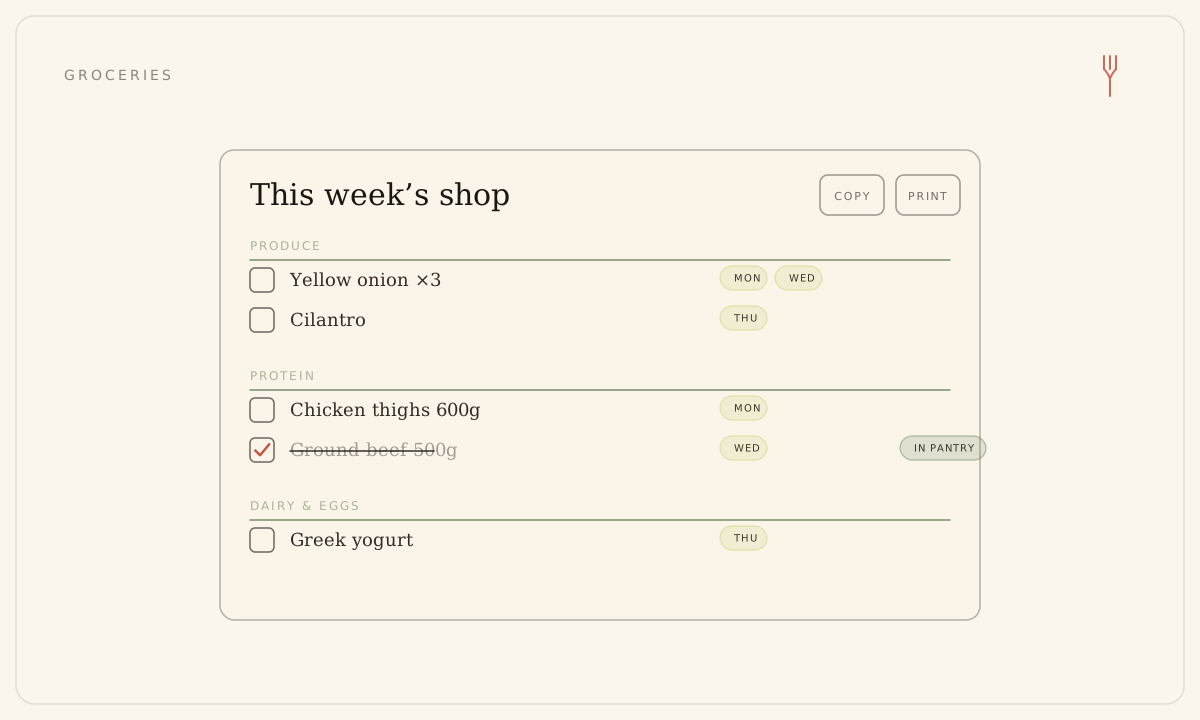
What's on the list
The list always reflects the current week's plan. Ingredients are summed across all the week's meals and scaled to your serving target, then sorted into shelves in store-walk order, so the list reads top to bottom the way you'd walk the aisles.
- Shelves run in a fixed order: Produce, Protein, Dairy & eggs, Pantry, Freezer, then Other. Empty shelves are hidden.
- Each line shows the ingredient, a summed quantity where one is known, and small day chips for the nights that need it.
- Garnishes and other optional ingredients are left off — the list is only what you actually have to buy.
- Anything already in your pantry, from any source, shows as checked and is dropped from exports.
Check items off as you shop
- Open the Grocery page — 'Grocery' in the web sidebar, or the Grocery tab on the phone.
- Tap the box next to an item to check it. The item is marked 'in pantry'.
- Checking adds that item to your pantry, so the check follows you across your devices and the rest of your household.
- Unchecking removes only that grocery-added row. A hand-added or scanned pantry item stays checked, because it's still on hand.
The check isn't just a tick — it writes to your pantry, which is the single source of truth. That's why items you scanned or added by hand already arrive checked.
Take the list with you
On the web, Copy puts a plain-text version on your clipboard and Print opens a clean printout — just the list with a header and the week label. On the phone, Share list opens the share sheet so you can send it to Notes, Messages, or anywhere else. Every export includes only what's still to buy.
Export is plain text, by design. There's no cart sync or one-tap ordering with a retailer yet — the list is yours to copy, print, or share however you shop.
Still stuck? Email hello@forkboard.app.