Getting started
Setting your preferences
Preferences is the control surface for your week. Onboarding stays short on purpose — a name, a household, maybe a few diets and allergens — so this is where the rest lives: the dials the plan reads before it fills a single night. Set what you know, and let the rest come from the thumbs you give meals over time.
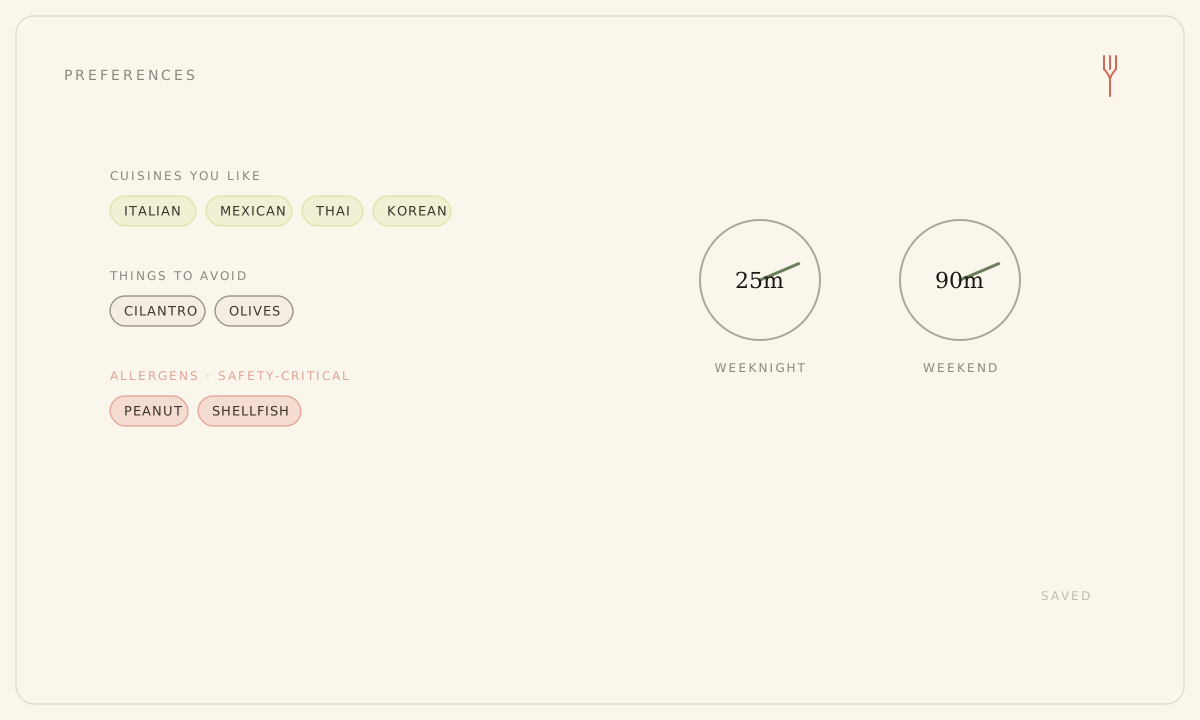
Tastes, per person
Four dials follow whoever they belong to, so a Family household plans around everyone at once. Cuisines you like (twelve to toggle — leave them empty and the plan favors variety). Things to avoid: freeform soft no-gos like cilantro or bell pepper, typed in and strongly steered around. Dietary patterns. And allergens, which are a hard line — a flagged allergen never appears, on any plan, on any tier.
The kitchen, household-wide
The rest describes the kitchen itself and applies to everyone in the household:
- Skill level — beginner through chef; defaults to comfortable.
- Weeknight and weekend time budgets — defaults 45 and 90 minutes. Match them if you never want a long cook.
- Available equipment — the plan won't reach for a tool you don't have.
- Cooking for — the serving target recipes and the grocery list are sized to.
- Week start (Monday by default) and measurement system (Imperial by default).
Nothing to save
Every field saves itself the moment you change it — there's no Save button. Watch the header: it reads Saving, then Saved. Web and the phone apps carry the same fields and stay in sync, so set a dial wherever you happen to be.
There's no budget setting here, and no per-day override. Day-by-day effort — a quick Monday, a real Sunday — is tagged on the Board, not in Preferences.
Still stuck? Email hello@forkboard.app.