Pantry & groceries
Scanning your shelves
On your phone, you can fill the pantry without typing every line. Point the camera at a shelf, or scan a bag of groceries by their barcodes — Forkboard reads what it finds and proposes a list. Nothing is saved until you say so.
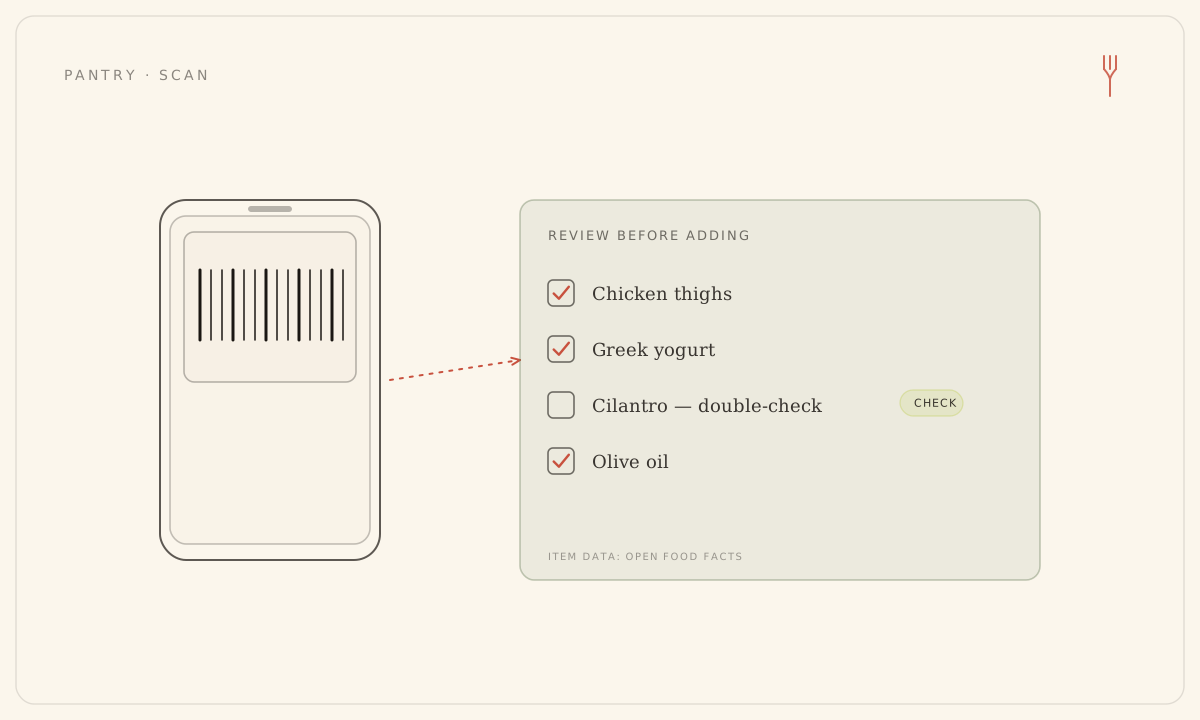
Scanning lives in the phone app, on iPhone and on Android alike. On the Pantry tab, tap Scan and choose how you want to capture: Take a photo, Choose from library, or Scan a barcode.
Scan a photo of your shelves
- On the Pantry tab, tap Scan, then Take a photo or Choose from library (grant camera or photo access if prompted).
- Point at your fridge interior, a pantry shelf, groceries on the counter, or a single product label, and capture one photo.
- Wait while the photo is read. A proposed list of ingredients appears in a review sheet.
- Fix any misread name, set quantities and units, and remove anything you don't want. Rows the scanner wasn't sure about are flagged Double-check.
- Tap Add to save the confirmed items to your pantry.
A photo won't guess amounts — quantities are unreliable from an image, so you set them yourself in the review sheet. The photo is read in memory and discarded; it is never stored. If no food is found, you get an empty state with a retry, or the option to try a barcode instead.
Scan grocery barcodes
- On the Pantry tab, tap Scan, then Scan a barcode (grant camera access if prompted).
- Point the camera at a product barcode. Each recognized code is looked up and stacked into a running list, so you can keep scanning through a whole bag (there's a torch toggle for low light).
- Tap Review items when you're done.
- In the review sheet, fix names, set quantity and unit, drop anything unwanted, then tap Add to save.
Barcodes work for EAN-13, EAN-8, UPC-A, and UPC-E. Any code that doesn't match a product database is listed as Not recognized — add those by hand. When product data comes from Open Food Facts, an attribution credit is shown.
Scan budgets and allergens
Photo scans draw on a separate monthly pantry-scan budget — Free 8, Solo 20, Family 40, and 10 on the trial — kept apart from your plan generations so capturing the pantry never eats into planning. A scan that fails is refunded. Barcode lookups don't count against that budget at all.
Allergen tags are always computed for every item you scan or add, however it got there — so a flagged ingredient never slips in unlabeled.
Still stuck? Email hello@forkboard.app.